From Facebook
Create a Photo Book from Facebook Photos
Automatically turn your Facebook photos into a beautifully organized printed photo book. Preserve your memories in a premium album ready to order in minutes.
Or make your book in the app
One Facebook, three books
Your year, your family, a birthday
Start with a book of your year, then make one for your family or for a birthday. Each is made from the photos you already shared on Facebook.


2026
A year in photos
Your year from Facebook, month by month: visits, calls, holidays and quiet days at home.


30 years together
A family year
A year of your family together, for an anniversary or just because.


Turning 60
A birthday book
The year before a birthday, ready as a gift for someone you love.
Swipe to see more
How it works
How to create a photo book from Facebook
Create your Facebook photo book automatically in just a few simple steps.


 Profile picture?Left out

 Not a photo?Left out


Connect Facebook
Choose the period, and the photos come straight from Facebook, nothing to download. Profile pictures, profile covers and non-photos stay out of the book.


A chapter for every month
Every page is laid out for you in the order it happened. Each month opens with its name: “May”, “June”. The crop follows faces and never cuts them.

Order your ready-to-print book
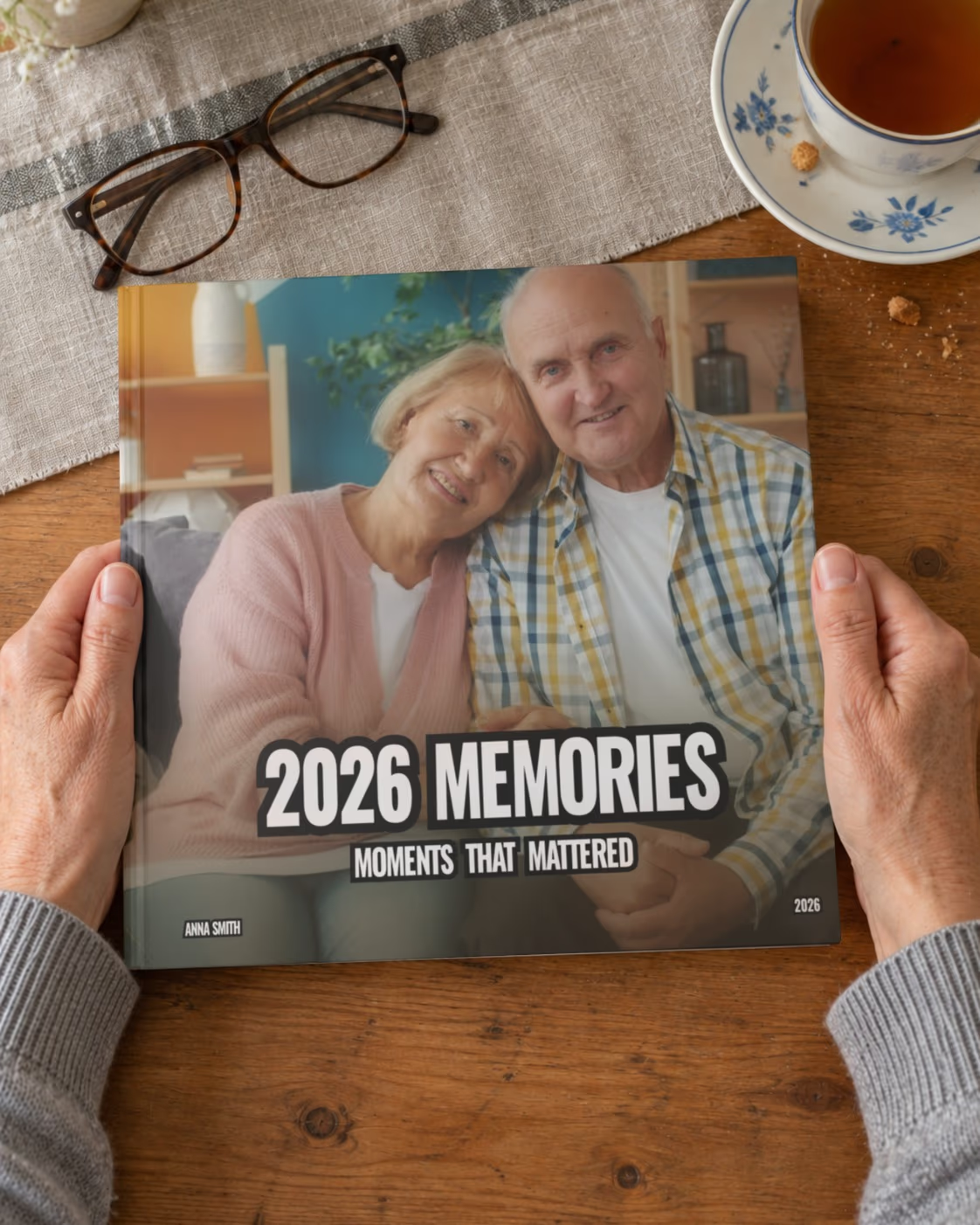
The cover writes itself: “2026 Memories · Moments That Mattered”. Order the book as it is, or change the photos and the cover first, if you like.
Inside the book
Every spread is different
One photo across a page, a pair, a grid of six — each spread laid out for its photos, year by year.


Swipe to see more
Reviews
What customers say about their books
From customers who ordered a book from us. How we collect reviews
Your Facebook photos, already organized
Connect your account — no downloading, no sorting
Your Facebook profile already holds years of your life. Memories.design connects to your account, collects the photos from the period you choose and arranges them in chronological order — you don't download or sort a single file.
Our system picks the best shots, removes duplicates and lays out every page automatically. The book is ready to print right away — and if you like, you can still change any page.
Want a book of one year? See the Year in Review Photo Book.

One book for every occasion
The same Facebook photos can become different books:
- a Year in Review Photo Book — your year from January to December;
- a Birthday Photo Book — the year between two birthdays;
- a Family Yearbook — a year of your family's life.
Every book is printed in premium quality and delivered to your door.
What to Make from Your Facebook Photos
Most of us have years of life on Facebook: photos from trips, parties and ordinary days that we posted ourselves. Printing them one by one is not realistic. A photo book puts a whole period on paper at once.
Pick any period
A single summer, one year or several years — you choose the dates, and only photos from that period go into the book.
No downloading
You don't need to save photos to your computer first. We collect them from your account and put them in order.
The best shots, not all of them
Duplicates and near-identical photos are removed, so the book tells the story without repeating itself.
Your old years too
Facebook often holds photos you no longer have on your phone — a good way to rescue them before they are forgotten.
Mix in other photos
Have photos that were never posted? You can also make a book from your own photos uploaded from any device.
A gift with a story
A book of the years you shared with a friend or a parent — made from photos already on Facebook.
The book
Premium photo book quality
Our photo books are printed with professional materials designed to last for generations.

- 21 × 21 cm
- 8.3 × 8.3 in hardcover
- 23–295
- pages, a spine 8 to 30 mm thick
- 200 g/m²
- glossy photo pages
- Sewn
- the pages sewn into the binding
Hardcover premium binding
- Size: 21 × 21 cm (8.3 × 8.3 in)
- Durable hardcover with matte finish
- Strong, long-lasting binding
Professional photo printing
- Premium 200 gsm paper
- Sharp details and vibrant colors
- Archival-quality printing
Flexible page count
- 23 to 295 pages
- Up to 1,770 photos
- Perfect for large collections
Fully customizable
- Automatically generated layouts
- 170+ layout variations
- Fully editable before printing
More books
Turn Your Facebook Memories into Life Stories
Continue your Facebook memories with year-in-review books, milestone albums, and long-term life story photo books designed to preserve your most meaningful moments.

Family Year Photo Book
Preserve a full year of your family’s life in one beautifully designed photo book. From everyday moments to special milestones, tell your family’s story year by year.
Learn more
Year in Review Photo Book
Capture your entire year in one beautifully designed photo book. Preserve your most important moments, milestones, and everyday memories in a premium printed album that tells the story of your year.
Learn more
Birthday Year Photo Book
Celebrate your personal year from birthday to birthday with a beautifully designed photo book. Capture your growth, experiences, and meaningful moments in a timeless printed keepsake.
Learn more
Swipe to see more
FAQ
Still have a question? Contact Us
How do I create a photo book from Facebook?
It's quick and easy:
- Open the Facebook photo book page and press Create photo book.
- Log in with Facebook and choose the time period.
- Press Create photo book — your book is designed automatically in about a minute.
- Your book is ready — order it as is, or change any page first if you like.
Which Facebook photos go into the book?
The photos you uploaded to Facebook yourself during the period you choose. Photos where friends tagged you are not included. We remove duplicates and near-identical shots and put the rest in chronological order. You can add more photos from your phone or computer at any time.
Can I make a book from several years of Facebook photos?
Yes. Choose any period when you create the book — one summer, one year or several years. A book holds up to about 1,770 photos (295 pages), so for a long period it's often nicer to make one book per year.
Can I add photos from my phone to the photo book created from Facebook photos?
You can add photos to your Facebook photo book from any device, not just your phone. Simply click the Edit photos button while viewing your book and select Upload photos.
Once you've uploaded your photos, we'll automatically sort them into chronological order. If the photos have metadata, we'll use the date the photo was taken, otherwise we'll use the date you uploaded it.
What access do you get to my Facebook account?
Only your name, profile picture and email, and the photos you uploaded to Facebook yourself — with their date, caption, album, place and number of likes. Read-only. We can't post anything or see your messages or friends. Your photos are used only to make your book. Prefer not to connect Facebook? You can upload your photos instead.
What size is the photo book and what paper is used?
- Size: 21 × 21 cm (8.3 × 8.3 in), square
- Hardcover with matte laminate, 2.5 mm thick
- Pages: 200 gsm glossy paper
- From 23 to 295 pages, up to about 1,770 photos
- The title and year are printed on the spine
How long does delivery take?
Your order goes through three stages: moderation (1–2 days), printing (about 5 business days) and shipping (up to 7 business days to the US, up to 10 business days or more elsewhere). In total, plan for about 2–3 weeks. During the holiday season it may take longer. When the book ships, you'll get an email with a tracking link.